Solve Captchas Automatically
v1.0.3Install the AZcaptcha browser extension and let it handle captchas for you — reCAPTCHA, hCaptcha, Turnstile and more.
Why Use the Extension?
Automate captcha solving right in your browser with zero code.
Auto-Solve on Page Load
Captchas are detected and solved automatically as soon as a page loads. No clicks needed.
All Major Captcha Types
Supports reCAPTCHA v2/v3, hCaptcha, Cloudflare Turnstile, FunCaptcha, and image captchas.
Uses Your Existing API Key
No separate account needed. Just paste your AZcaptcha API key and start solving.
Lightweight & Private
Minimal footprint. No tracking, no data collection. Your API key stays on your device.
Up and Running in 3 Steps
Install the Extension
Download the .zip file above, unzip, and load it in your browser. Works on Chrome, Edge, Brave, and Firefox.
Enter Your API Key
Open the extension popup, go to Settings, and paste your AZcaptcha API key.
Browse & Auto-Solve
That's it. Visit any page with a captcha and the extension handles the rest automatically.
See It in Action
Clean interface, powerful features. Here's what the extension looks like.
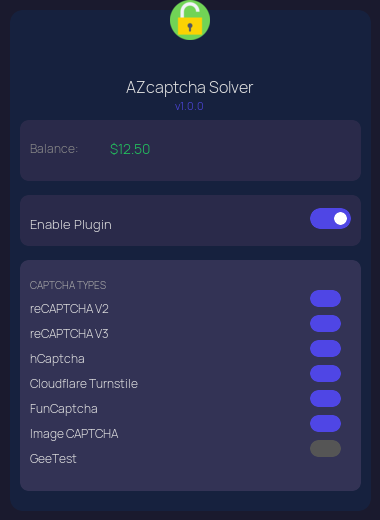
Extension popup with captcha type toggles
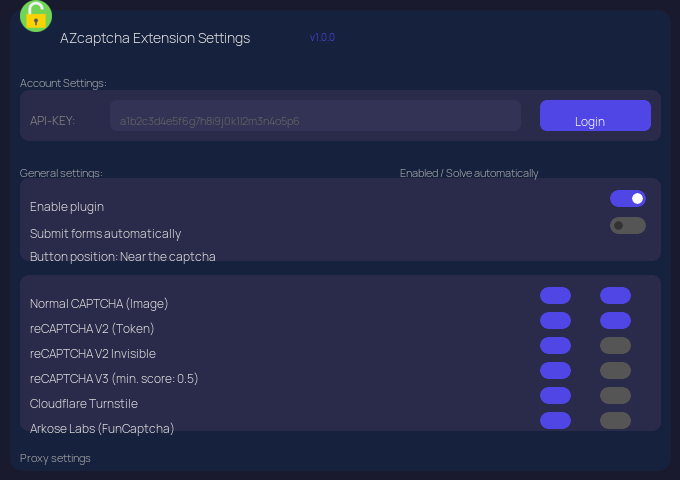
Full settings page with API key, captcha types, and proxy configuration
Quick Setup Guide
-
1
Open Extension Popup Click the AZcaptcha icon in your browser toolbar.
-
2
Go to Settings Navigate to the Settings or API Key section.
-
3
Paste Your API Key Copy your key from the dashboard and paste it in.
-
4
Save & Done Click Save. Captchas will now be solved automatically.
Supported Browsers
Google Chrome
Microsoft Edge
Mozilla Firefox
Brave Browser
What's New
- New Image Captcha Options in settings — set module, text instructions, numeric, math, phrase, case
- Per-site captcha rules — override options for specific websites using URL patterns
- Global defaults apply when no site rule matches
- Updated API docs links in extension manual
- Fixed API domain — all requests now use
azcaptcha.com - Updated extension manual with correct links
- Auto-solve reCAPTCHA v2/v3, hCaptcha, Cloudflare Turnstile, FunCaptcha, GeeTest
- Image captcha detection and solving
- Configurable per-captcha-type toggles
- Auto-submit forms after captcha solved
- Proxy support (HTTP, HTTPS, SOCKS4, SOCKS5)
- URL blacklist for skipping specific domains
- Custom auto-submit rules with URL pattern matching
- Multi-language support (English, Spanish, Russian, Chinese)
- Works on Chrome, Edge, Brave, and Firefox